 Nursery Invoice
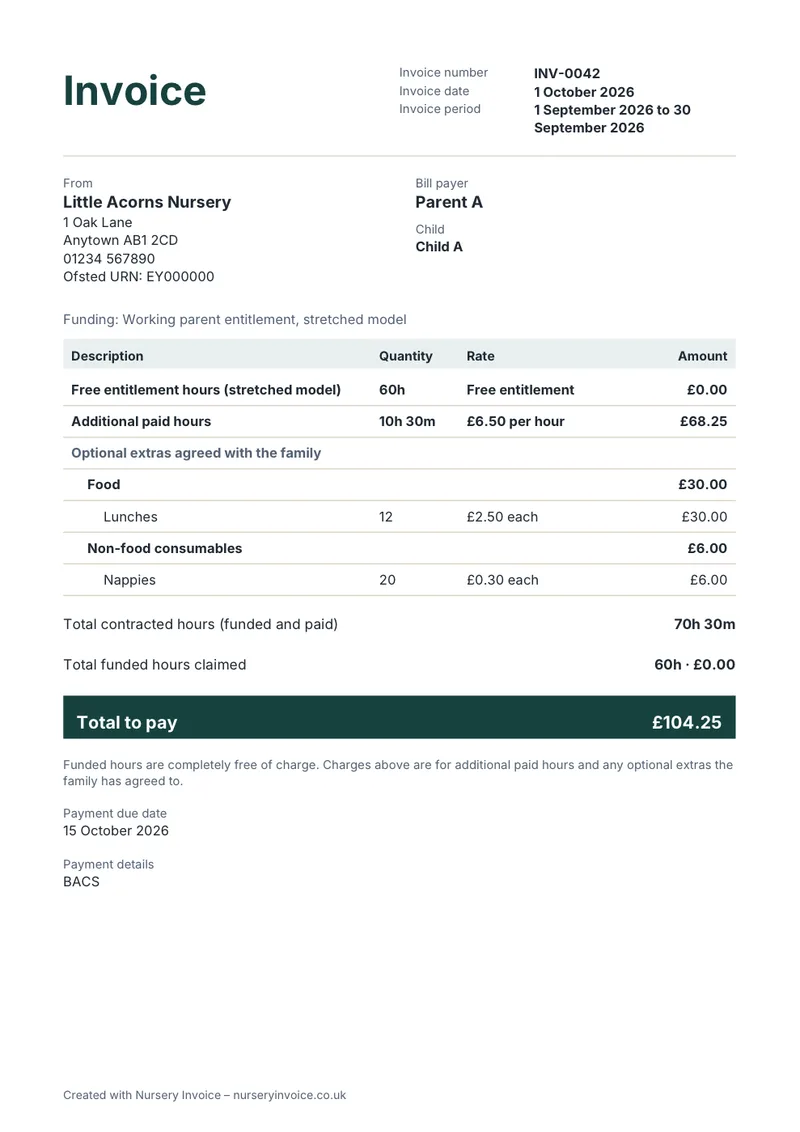
Since January 2026, every funded-hours invoice has to be itemised.
The DfE's early education and childcare statutory guidance (section A1.36) asks providers to break invoices down into separate lines for free entitlement hours, additional paid hours, food, non-food consumables and activities. Councils check invoices against this, and each one words its checklist a little differently.
If you're doing it in Word, Excel or general accounting software, it's easy to get a line wrong, and hard to know if you have.
Three steps. Two minutes.
Step 1: Choose your council.
We lay the invoice out the way your local authority's guidance shows it.
Step 2: Enter the hours.
Funded hours, paid hours and any extras the family has agreed to. We split and total them for you.
Step 3: Download your PDF.
A clean PDF, ready to send to the family or keep for your records.
Make a free invoice
What a funded hours invoice must include
- The word "Invoice", an invoice number, date and invoice period
- Your setting's full name and contact details
- Funded hours for the period, shown completely free
- Additional paid hours and the hourly rate, on their own line
- Meals, consumables and activities, each itemised separately
- Total contracted hours and total funded hours claimed
- A clear total, so families can see exactly what they're paying for, and what they aren't
Some councils, such as Staffordshire, also want the value of the free hours shown. Choose your council and we'll include it where it's asked for.
Made for nurseries, pre-schools and childminders that don't need a whole management system.
- School nurseries using Arbor or another school MIS that doesn't produce itemised nursery invoices.
- Pre-schools and committee-run settings working from spreadsheets or templates.
- Childminders who want a professional invoice without paying for a full platform.
Children's details stay with you.
The free generator builds your invoice in your browser. We don't store children's names or families' details, and nothing is shared with anyone. Close the page and it's gone.
Invoicing every family, every month?
Nursery Invoice is coming: monthly invoice runs for all your families, funded hours calculated from your register, stretched and term-time funding handled for you, and a parent portal for invoices.
Frequently asked questions
Is it really free?
Yes. Making one invoice at a time is free, with no card and no account needed. The full product for monthly runs will be paid.
Is there a free funded hours invoice template?
This generator is a free alternative to a Word or Excel template. You choose your council, enter the hours, and download a PDF with the funded hours at £0.00.
What should be on a funded hours invoice?
The word "Invoice", an invoice number, date and invoice period, your setting's full details, funded hours at £0.00, additional paid hours with the hourly rate, food, non-food consumables and activities itemised separately, and the total contracted hours and total funded hours claimed.
Will my council accept it?
The layout follows the DfE itemisation rule and published council guidance. Councils set their own requirements, so if your local authority has asked for something specific, check it against their checklist. If you spot a difference, tell us and we'll update your council's format.
My council isn't listed. Can I still use it?
Yes. Choose "My council isn't listed", tick anything your council's checklist asks for, and send us your council's guidance so we can add it.
Can I charge for consumables on funded hours?
Only as voluntary charges the family has agreed to. The invoice keeps them on their own lines so it's clear they're separate from the free hours. Your council's guidance has the detail.
Does it work for stretched funding?
Yes. Enter the hours for the invoice period and choose whether the family takes their funding term-time or stretched across the year.
Is it for childminders as well as nurseries?
Yes. It works for nurseries, pre-schools, school nurseries and childminders.
Does it store children's names?
No. The invoice is built in your browser, and nothing about the children or families is stored or shared.